> ## Documentation Index
> Fetch the complete documentation index at: https://docs.withrealm.com/llms.txt
> Use this file to discover all available pages before exploring further.
# Gong
> Connect Gong to sync call recordings and transcripts
Connect Gong to Realm to make call recordings and transcripts searchable. Navigate to **Settings** > **Data sources** and click **Connect** on Gong, or click **Reconnect** if already connected.
## Connecting Gong
Connect Gong using an API key. On the data source page, enter:
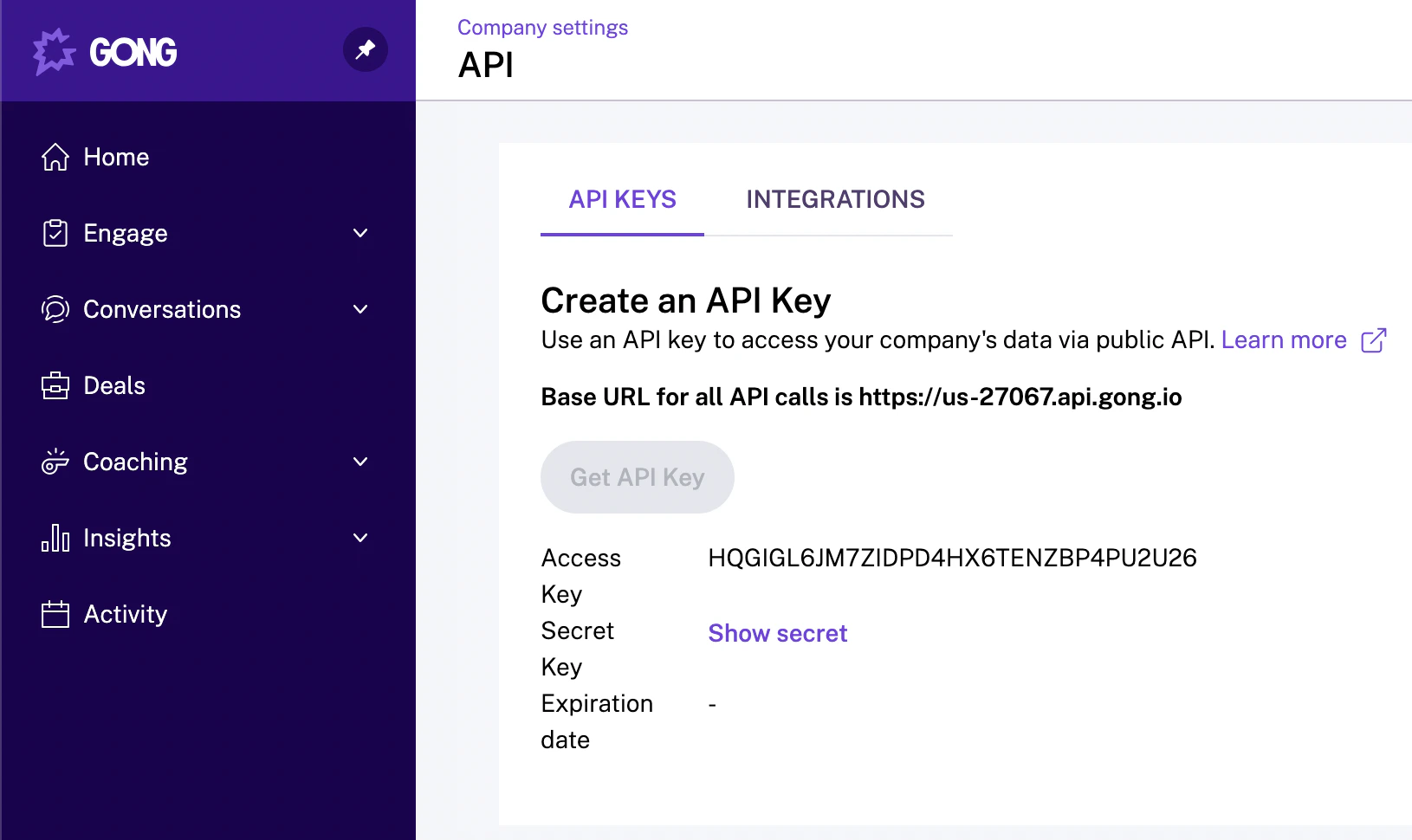
1. **API key** and **API key secret** - In Gong, go to **Company Settings** > **Ecosystem** > **API** > **API Keys** and click **Get API Key**.
2. **Domain** - Your Gong domain (the Base URL shown on the API Keys page).
 The person connecting should be a Gong admin with access to all calls you want to sync.
## What gets synced
| Content | Synced |
| ------------------------------------------------------- | ------ |
| Call transcripts (with speaker identification) | Yes |
| Call metadata (participants, date, duration, direction) | Yes |
| Trackers and key topics | Yes |
| Call comments | Yes |
| CRM context (linked Salesforce/HubSpot data) | Yes |
## Permissions
Realm enforces Gong's native permission model. Users can only see calls they have access to in Gong.
You can override this by switching to "Everyone in this organization" on the data source settings page, which makes all synced Gong data visible to all Realm users.
## Retention period
You can configure a retention period for synced call data from the data source page. Options include:
| Setting | Description |
| -------------- | ------------------------------------ |
| **Indefinite** | Keep all synced call data |
| **1 month** | Remove call data older than 1 month |
| **3 months** | Remove call data older than 3 months |
| **6 months** | Remove call data older than 6 months |
| **1 year** | Remove call data older than 1 year |
The person connecting should be a Gong admin with access to all calls you want to sync.
## What gets synced
| Content | Synced |
| ------------------------------------------------------- | ------ |
| Call transcripts (with speaker identification) | Yes |
| Call metadata (participants, date, duration, direction) | Yes |
| Trackers and key topics | Yes |
| Call comments | Yes |
| CRM context (linked Salesforce/HubSpot data) | Yes |
## Permissions
Realm enforces Gong's native permission model. Users can only see calls they have access to in Gong.
You can override this by switching to "Everyone in this organization" on the data source settings page, which makes all synced Gong data visible to all Realm users.
## Retention period
You can configure a retention period for synced call data from the data source page. Options include:
| Setting | Description |
| -------------- | ------------------------------------ |
| **Indefinite** | Keep all synced call data |
| **1 month** | Remove call data older than 1 month |
| **3 months** | Remove call data older than 3 months |
| **6 months** | Remove call data older than 6 months |
| **1 year** | Remove call data older than 1 year |