

October 9, 2026
Product Updates: Translation, multiple tender rounds, and updates to MCP
Tenders often come back for another round, not everyone on your team reads the same language, and a lot of you have asked to use Realm from some other tools you already work in. Here’s what we built for each. During the past few weeks, we’ve shipped 3 major updates to Realm:- Translation: read and write an RFP in your own language
- Multiple tender rounds: see what changed since the last round and bring answers into the new questionnaire
- Updates to MCP: run Realm from other AI tools you use
Translation
Everyone on a questionnaire can now pick their own working language. Realm shows the questions, answers and titles in that language, and you can write in it too. Your choice only changes your own view. If you write an answer in Finnish, Realm translates it into the RFP’s language and saves it there, so a colleague working in German sees it in German. When you export, the questionnaire is always in its original language, whatever language you worked in. If you need it in another language, “Export translated” gives you a copy in any language your team used.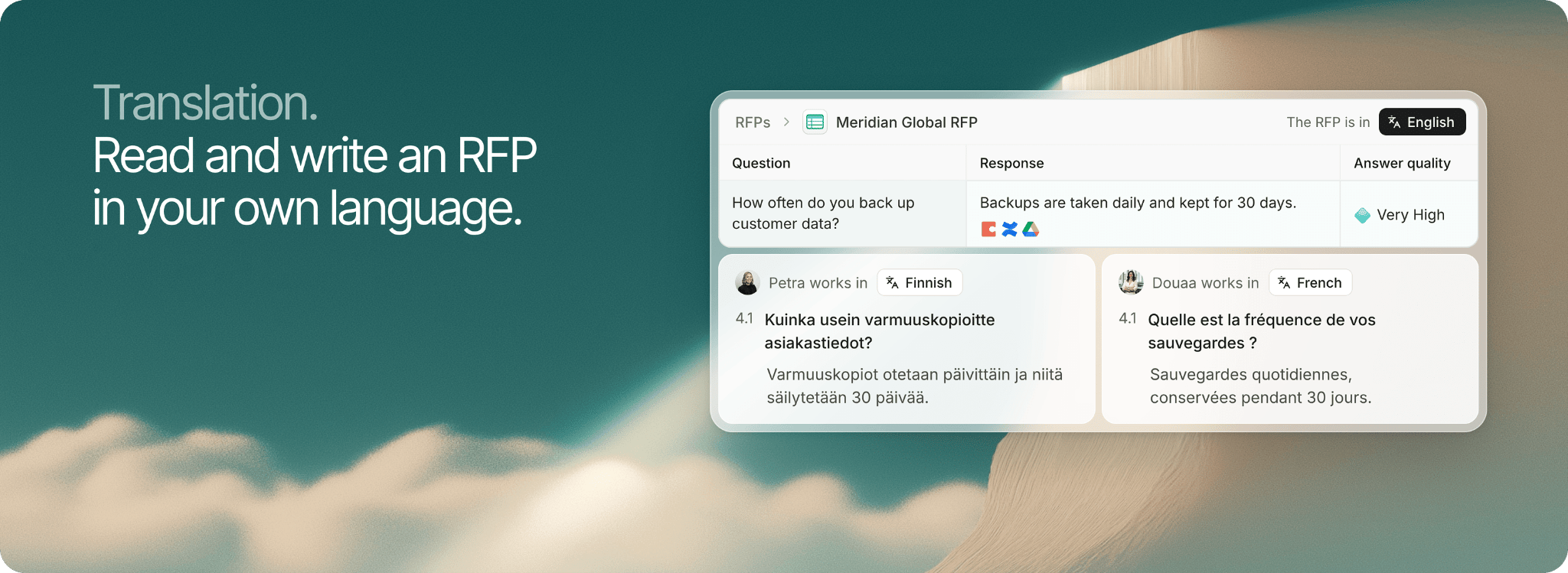
Multiple tender rounds
When a tender you already bid on comes back, Realm can now use the earlier round in two ways. Tender comparison shows what changed, and Previous round import fills in your earlier answers where nothing changed.Tender comparison
Open the new project and link it to the earlier one from the project header. Realm suggests the most likely match. A Previous round comparison then appears in the Analysis tab, sorting this round’s requirements into changed, unchanged, new and removed, with a summary of what was reworded. If both rounds have a questionnaire, the comparison also shows how many rows changed in each file. Comments your team left last round are checked against the new round, so you can see which ones still need attention.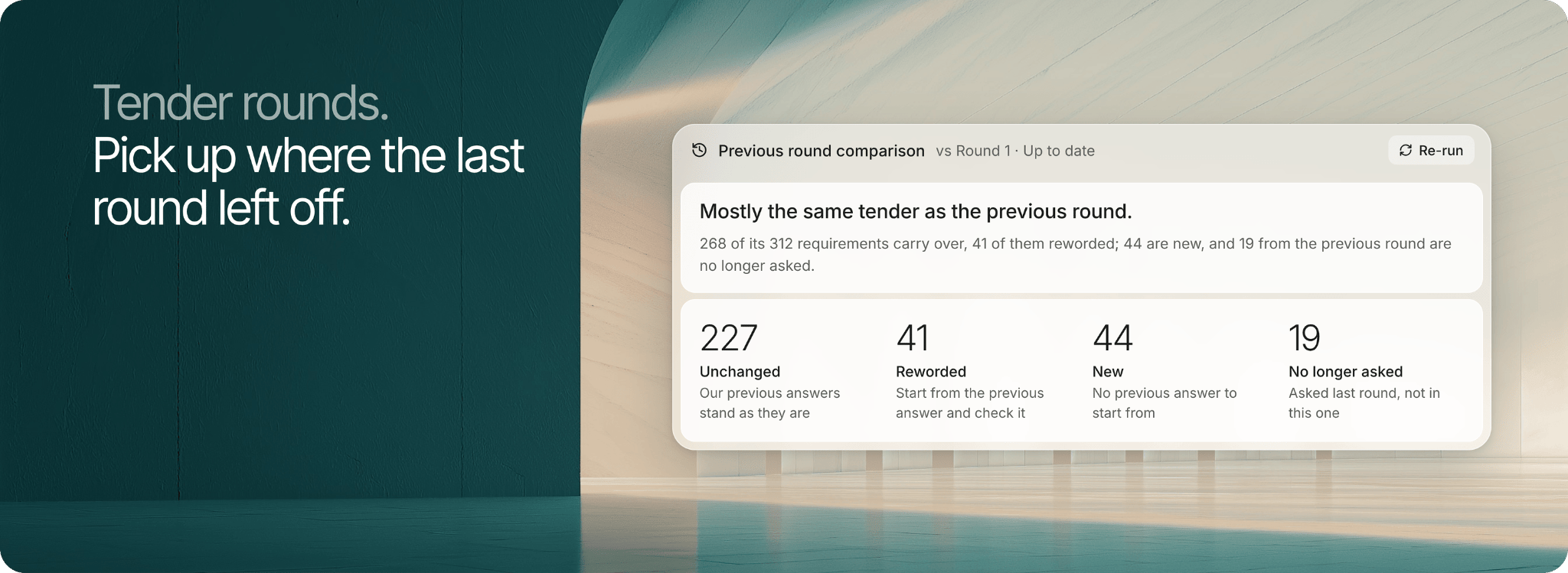
Previous round import
When you upload a questionnaire, Realm checks it against your earlier RFPs and suggests the closest matches, with a match percentage. Click Import answers and every unchanged question gets last round’s answer, confirm status and sources. Changed and new questions are left for you to fill. Imported rows are labeled, so you can see where they came from. You’ll find it in the processing view. See Import answers for more.Updates to MCP
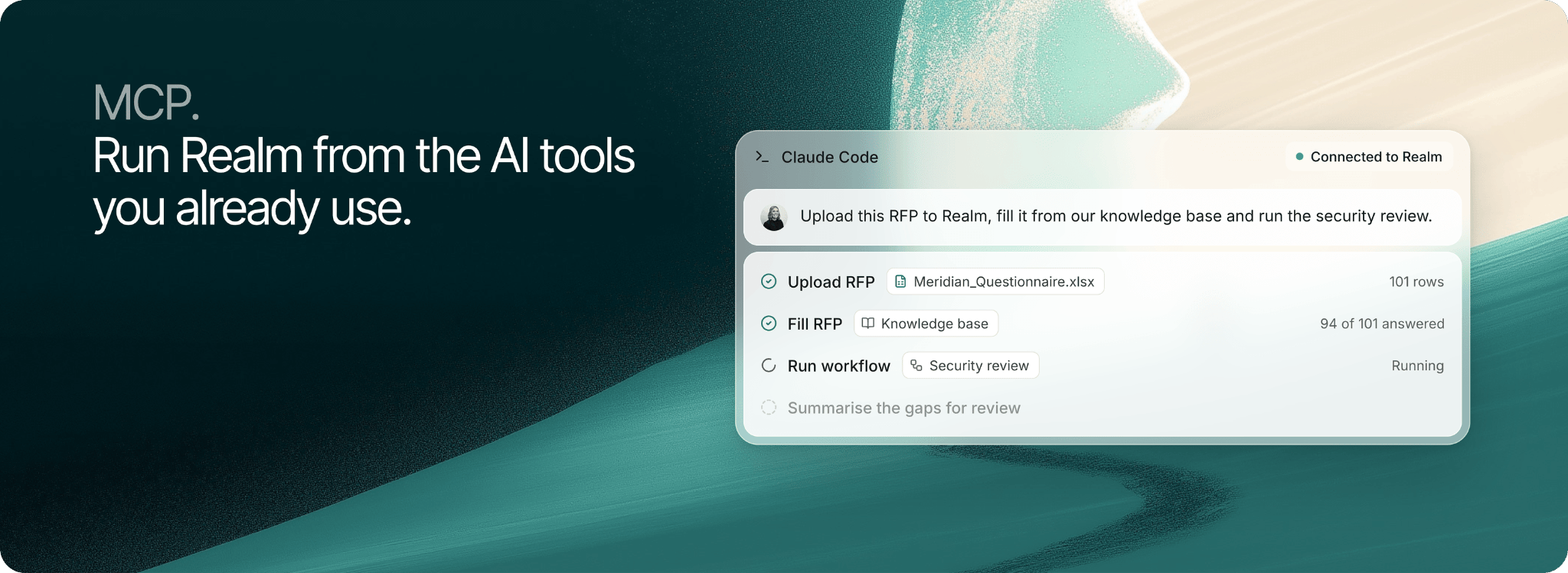
Realm works as an MCP server, so a tool such as Claude, ChatGPT or Copilot can reach Realm directly instead of copy-pasting context back and forth. That connection used to search and ask only. It now covers the whole product: search your knowledge base, talk to your agents, create and edit documents, folders, tags, projects and comments, upload, fill and update RFPs, and run your agents and workflows. Every action runs as you, so your tool sees and changes only what you can. There is no API key: point the tool at your Realm domain followed by/api/mcp and sign in once in the browser.
September 24, 2026
Product Updates: Improved RFP projects and workload
Three updates to projects, and a new way to see your team’s work:- Improved Go/No-Go: decide whether a tender is worth bidding
- Suggested documents: Realm understands what the buyer wants from you
- Creating documents: write documents directly inside the project
- Workload: see who is working on what, and when it is due
Go/No-Go
Realm can now better help you decide whether to bid. It can be tailored to exactly fit how your company does Go/No-Go analysis. You set the fit dimensions it scores you on, things like legal fit or commercial value, and each comes back with a score and the blockers behind it. Each dimension can have its own set of knowledge, or even search the web to do competitor analysis. Every requirement is checked against your knowledge base, with must-haves weighing the most and anything without evidence raised as an open question rather than a fail. Hard blockers, like a missing certification, are flagged up front. Realm recommends Go, No-go or Improve position, and your team records the real decision.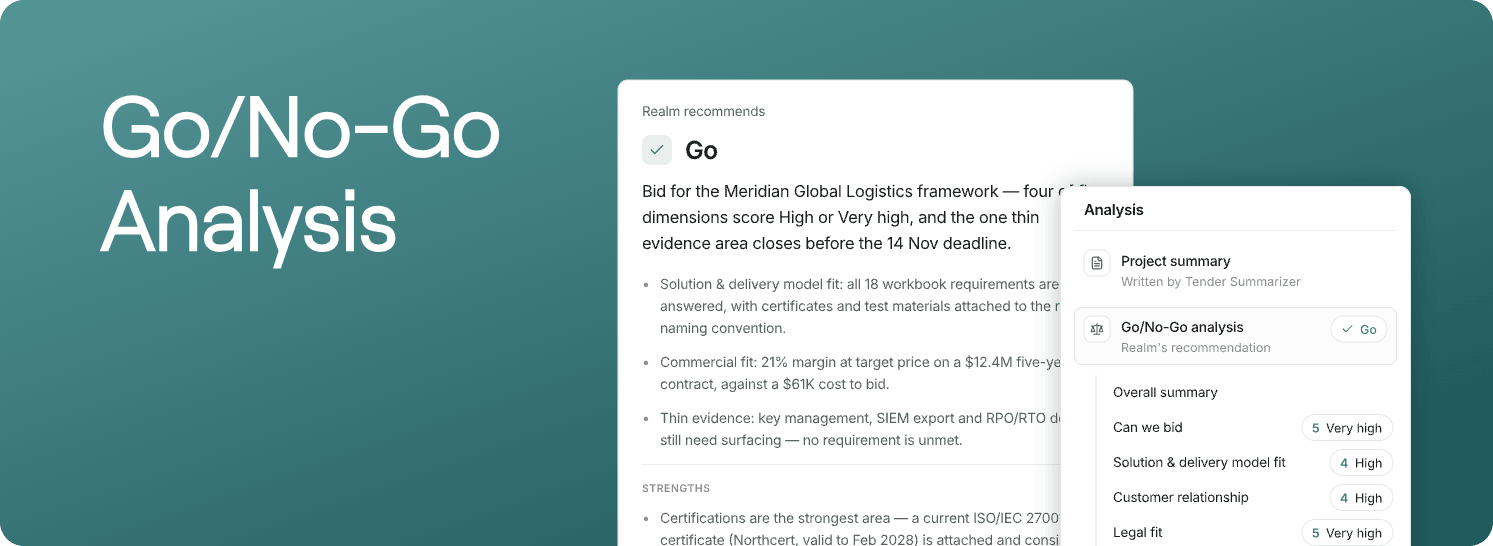
Suggested documents
Realm reads the materials in the project and finds the different documents you need to hand in. Click Create on any of them to generate it, upload files, start a document, or link one you already have.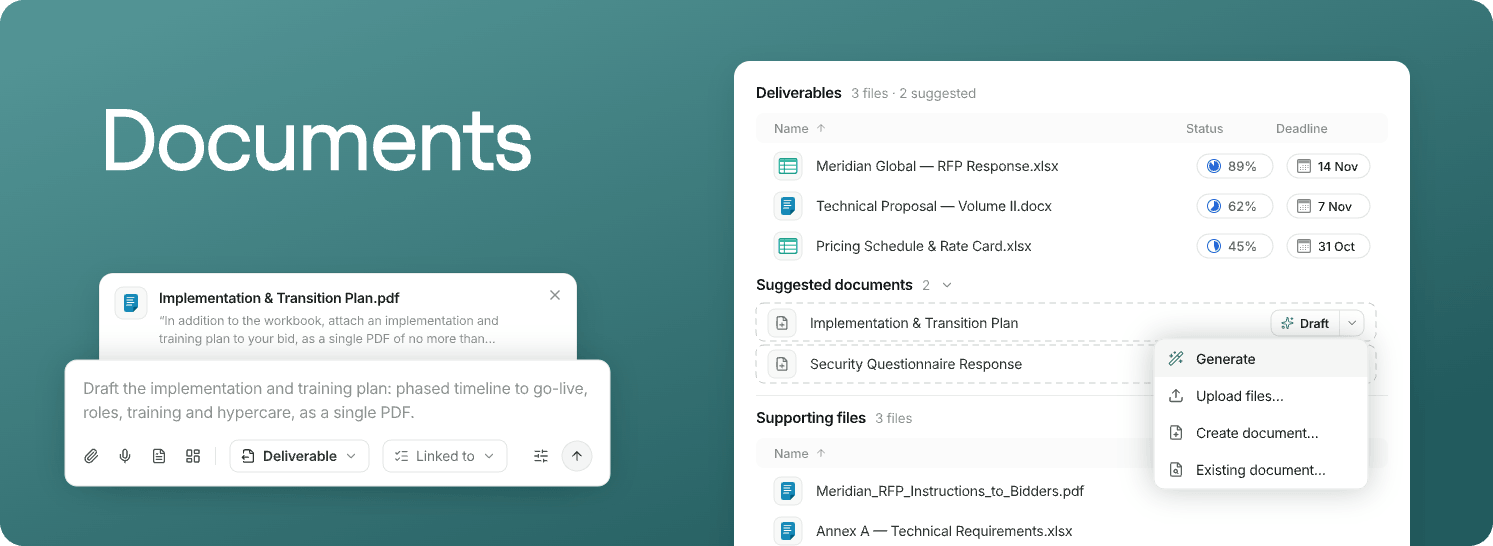
Creating documents
Inside the project, describe the document you want, start from a template, or start blank and write it yourself. Realm writes the document from answers you already have, once you’ve approved the outline. Find it under Create on any deliverable. See Document responses for more.Workload
The new Workload tab on the RFP list shows who is working on what, and when it is due. View it by person or by RFP. Change task deadlines and statuses right on the timeline. Rows nobody is assigned to are counted, so you can hand them out in a click.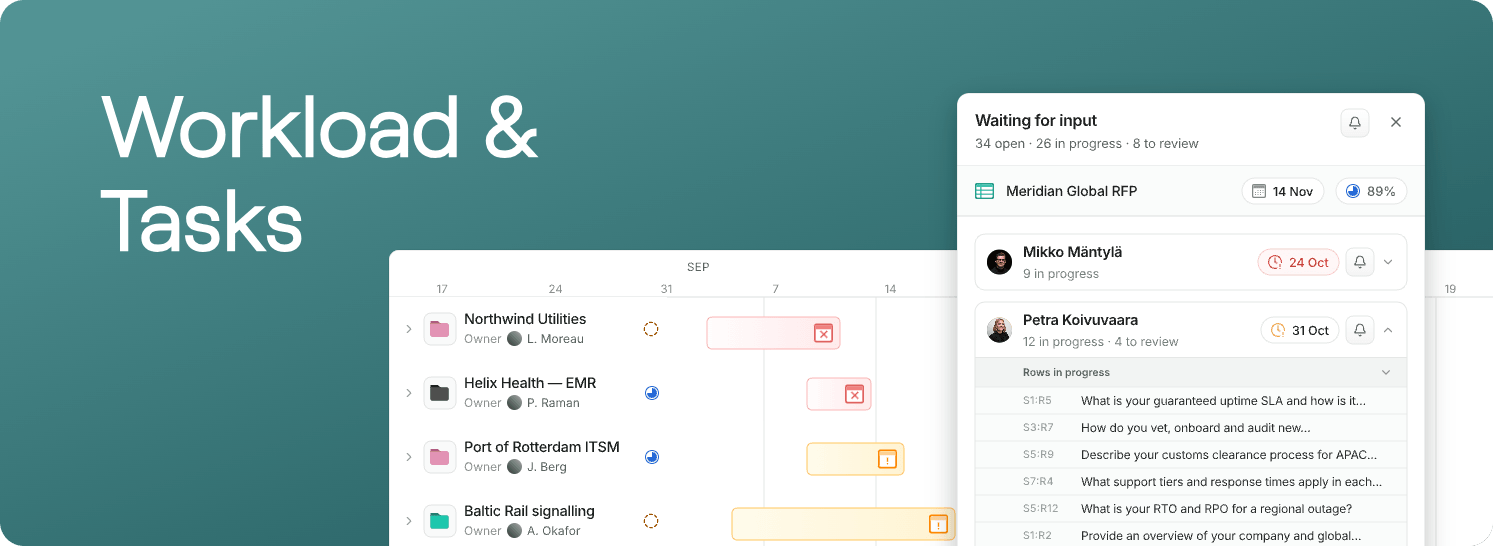
September 4, 2026
Product Updates: Tags, answer profiles, and attachments
Over the past two weeks, we’ve shipped three major updates to Realm:- Tags: choose exactly which knowledge Realm answers from when filling RFPs
- Answer profiles: different answer styles for different questionnaires
- Attachments: the right files onto the right rows, faster
Tags
Tags now decide what Realm reads when it fills an RFP. Tag an RFP, or pick tags when you start filling one, and the information comes only from material carrying those tags. You can combine several tags, which helps if you sell multiple products and often bid them together. Custom agents used to do this. Your agents are still there for Chat, and an untagged RFP fills against your whole knowledge base as before. The custom instructions the agents carried now live in Answer profiles, see below. We have already been in touch with some of you, and we would love to help anyone else through the switch, just reply and we’ll book a short call.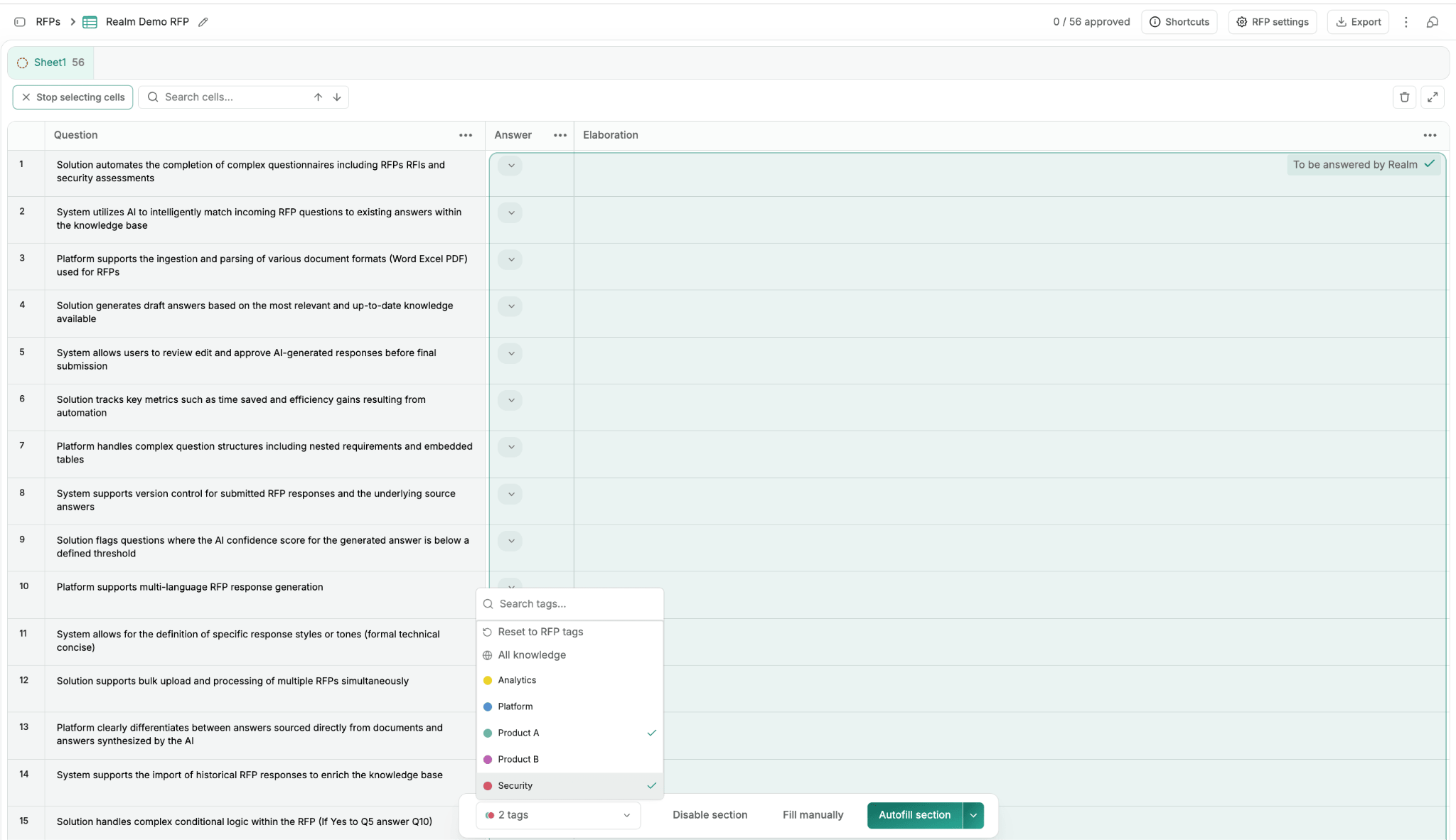
Answer profiles
You can now set up several named answer profiles instead of one organization-wide style. Each profile sets answer length (Concise or Detailed) and any instructions you give it. Realm follows your instructions more closely than custom agents did, so the tone you set comes through. Your answers read exactly as they did before. There’s nothing to set up unless you want different styles for different questionnaires.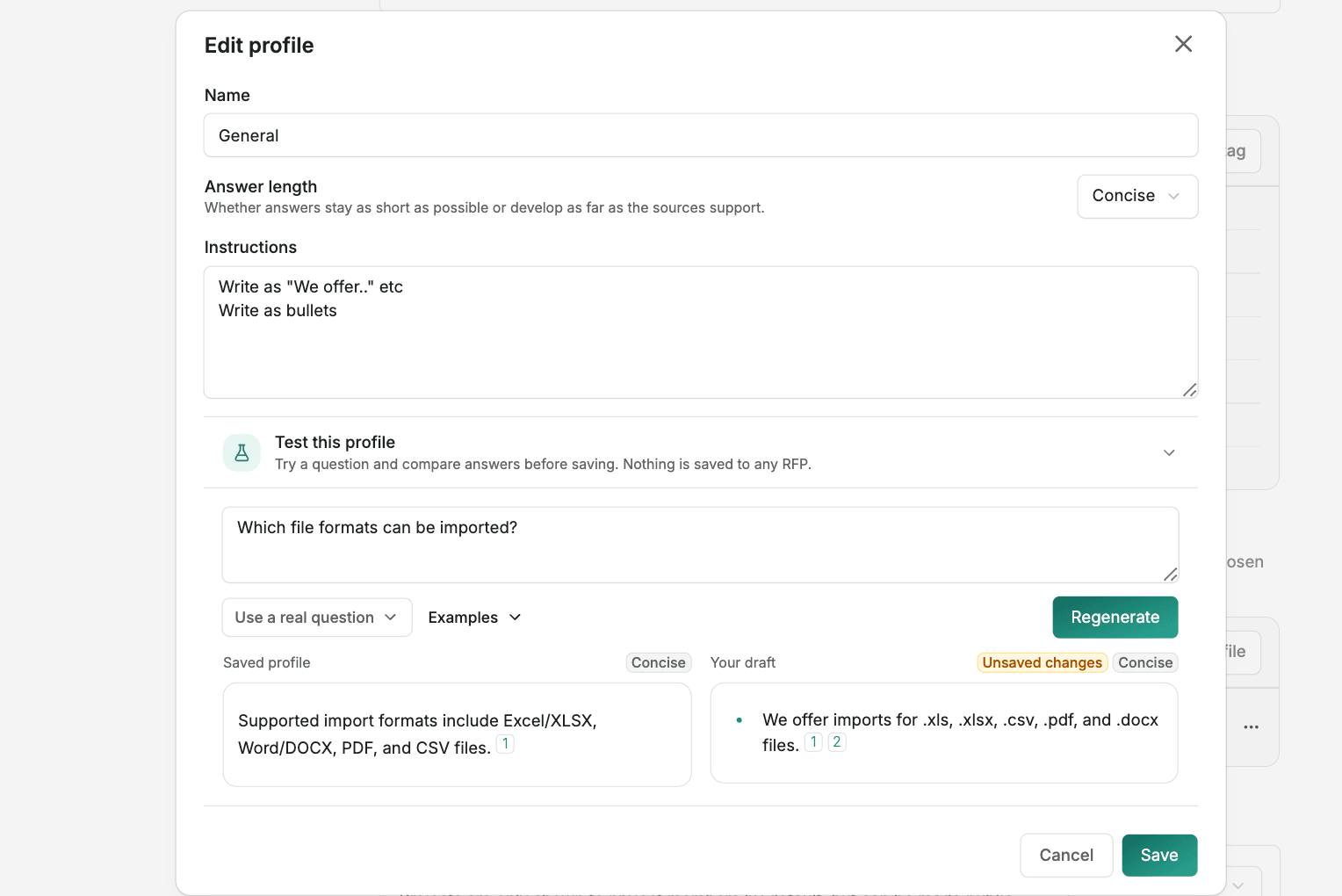
Attachments
Questionnaires often ask you to supply a document alongside the written answer: an ISO certificate, an insurance policy, a reference case. Realm now handles those too. Every RFP has an Attachments column. Realm reads what the buyer asked for, works out which rows want a document, and proposes files from your knowledge base. You approve what it picked, swap it for something else, or attach your own, including a file you upload straight onto the row without adding it to your knowledge base first. Realm also learns from your team. When someone has attached a particular certificate to the same question in a past RFP, that one gets offered first.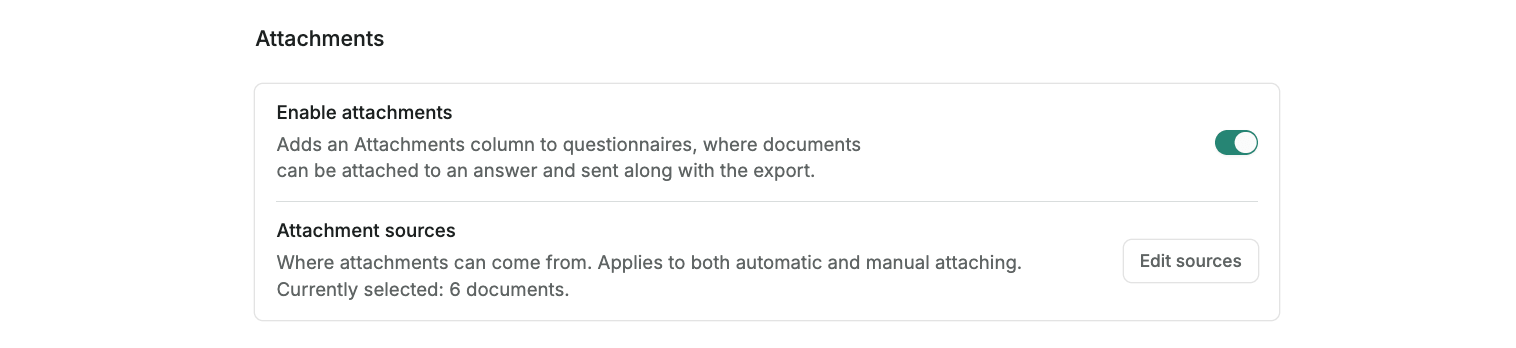
August 28, 2026
Product Updates: Realm inside RFPs, my tasks, user roles, and RFP analytics
During the past few weeks, we’ve shipped four major updates to Realm:- Realm inside RFPs: ask about the questionnaire you’re on and change it without leaving the page
- My tasks: one place to see the work that’s assigned to you
- User roles: shape organization roles around your team
- RFP analytics: a dedicated, more detailed view of your RFPs
Realm inside RFPs
The Realm agent now opens inside the RFP you’re working on to help you get it over the line right there on the page. It explains a given answer or requirement, assigns, edits and approves rows, and gives you feedback on the answers so you can improve them. Most requests are a single sentence: “Assign the whole security section to Johan”, or “Rewrite section 3 shorter and tell me what you changed.” Batch fills come back for you to approve first, and every answer edit is saved as a version you can restore.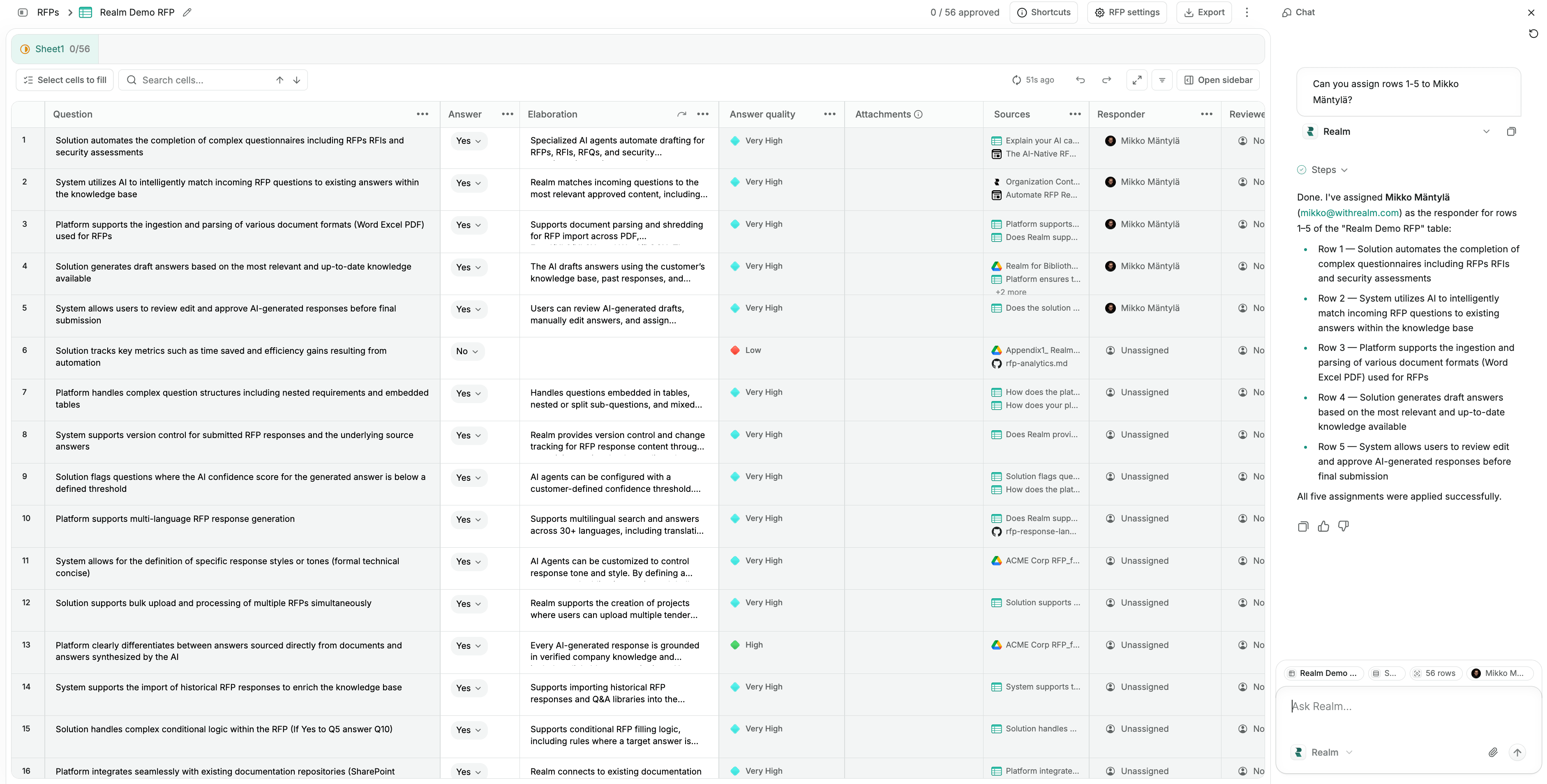
My tasks
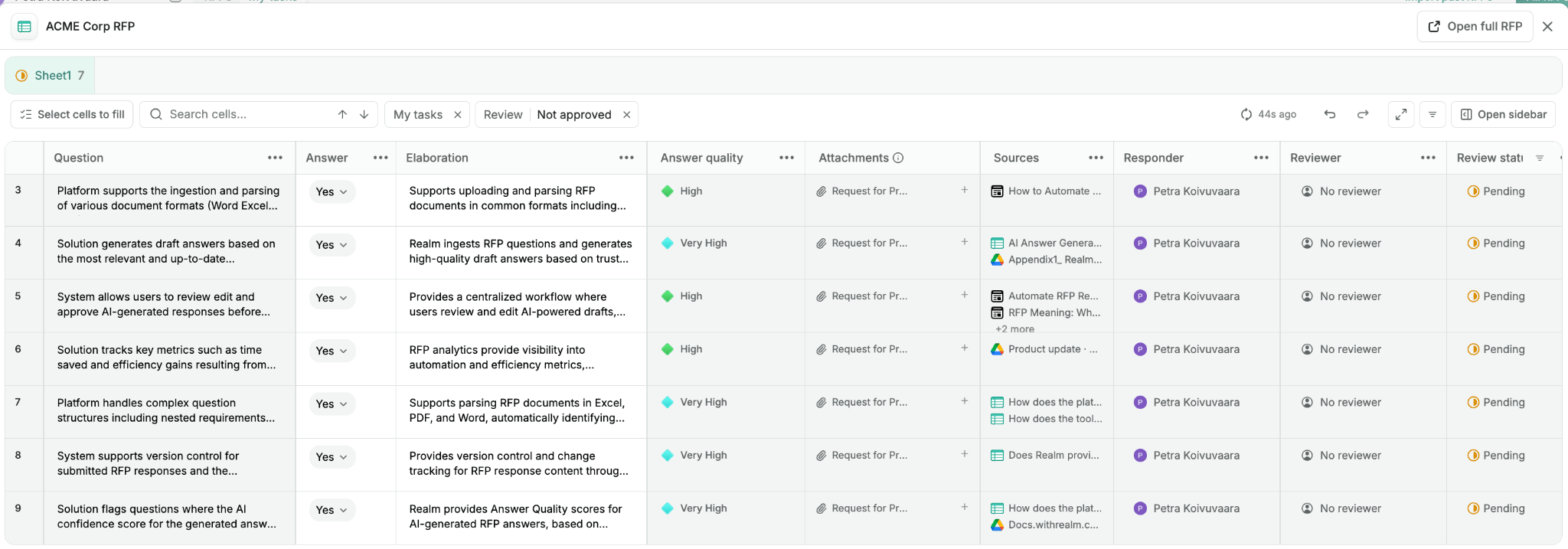
The RFP list now has a My tasks page, showing only the questionnaires and Document responses where you have open work: how many items are assigned to you, the RFP’s deadline and your own.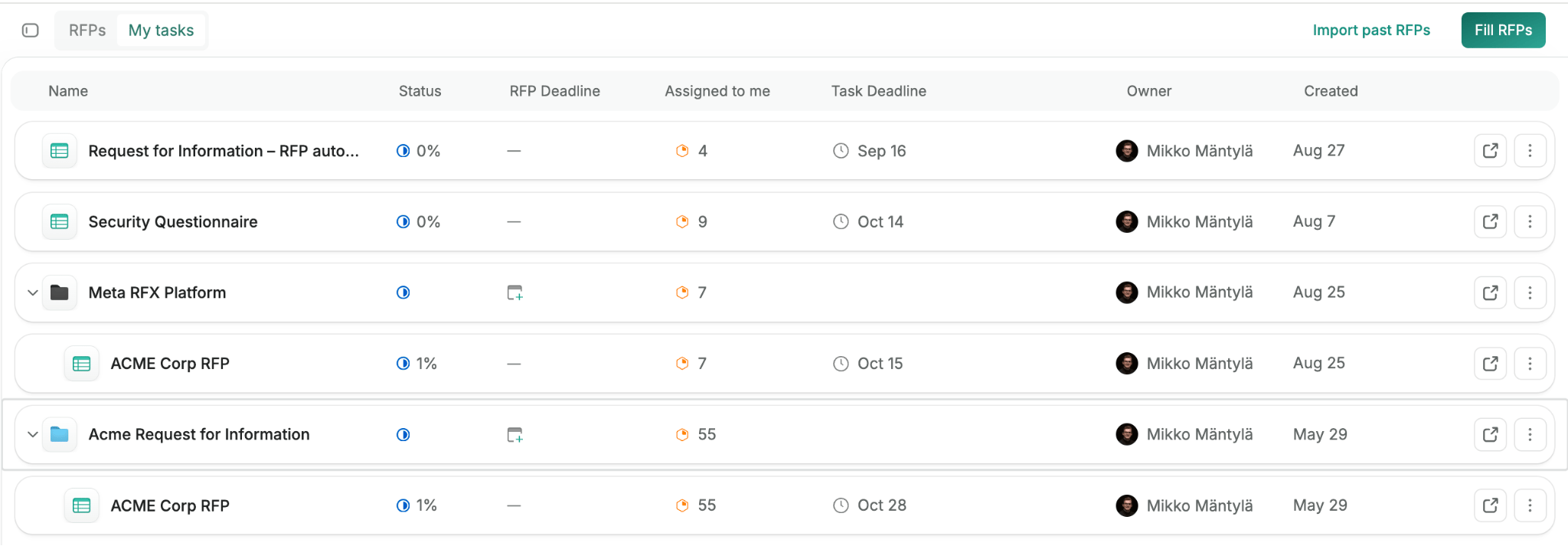
User roles
Organization roles are now yours to shape. There’s a new Owner tier with access to everything, and everyone who’s an admin today becomes an Owner, so nobody loses access.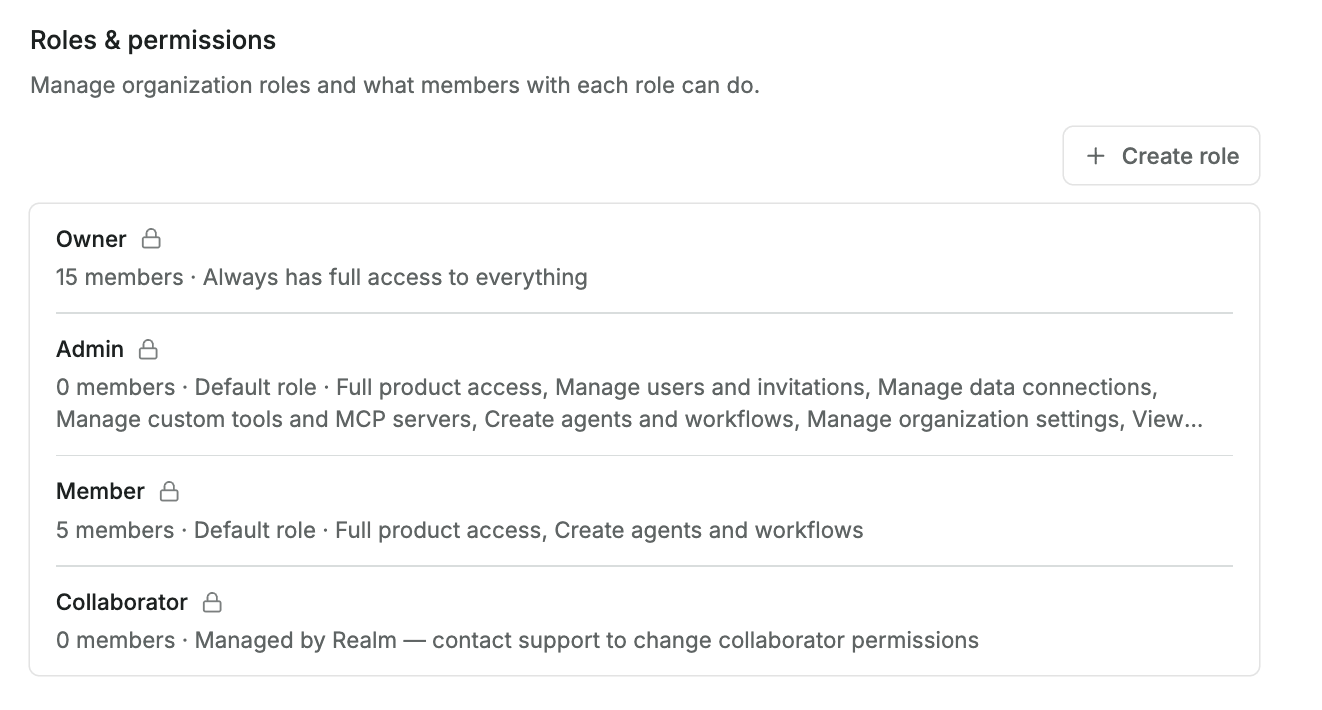
RFP analytics
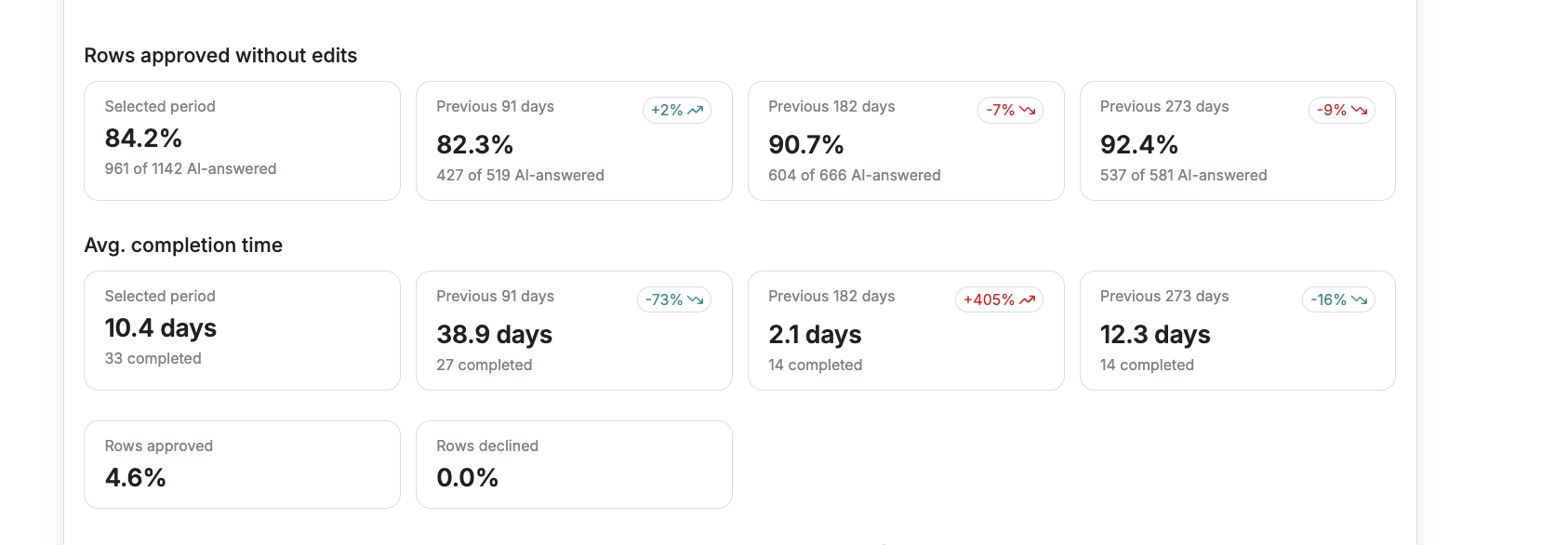
Analytics has a new dedicated RFPs tab for admins, charting RFPs started and completed, filled cells, RFPs per owner, rows per assignee, and average completion time.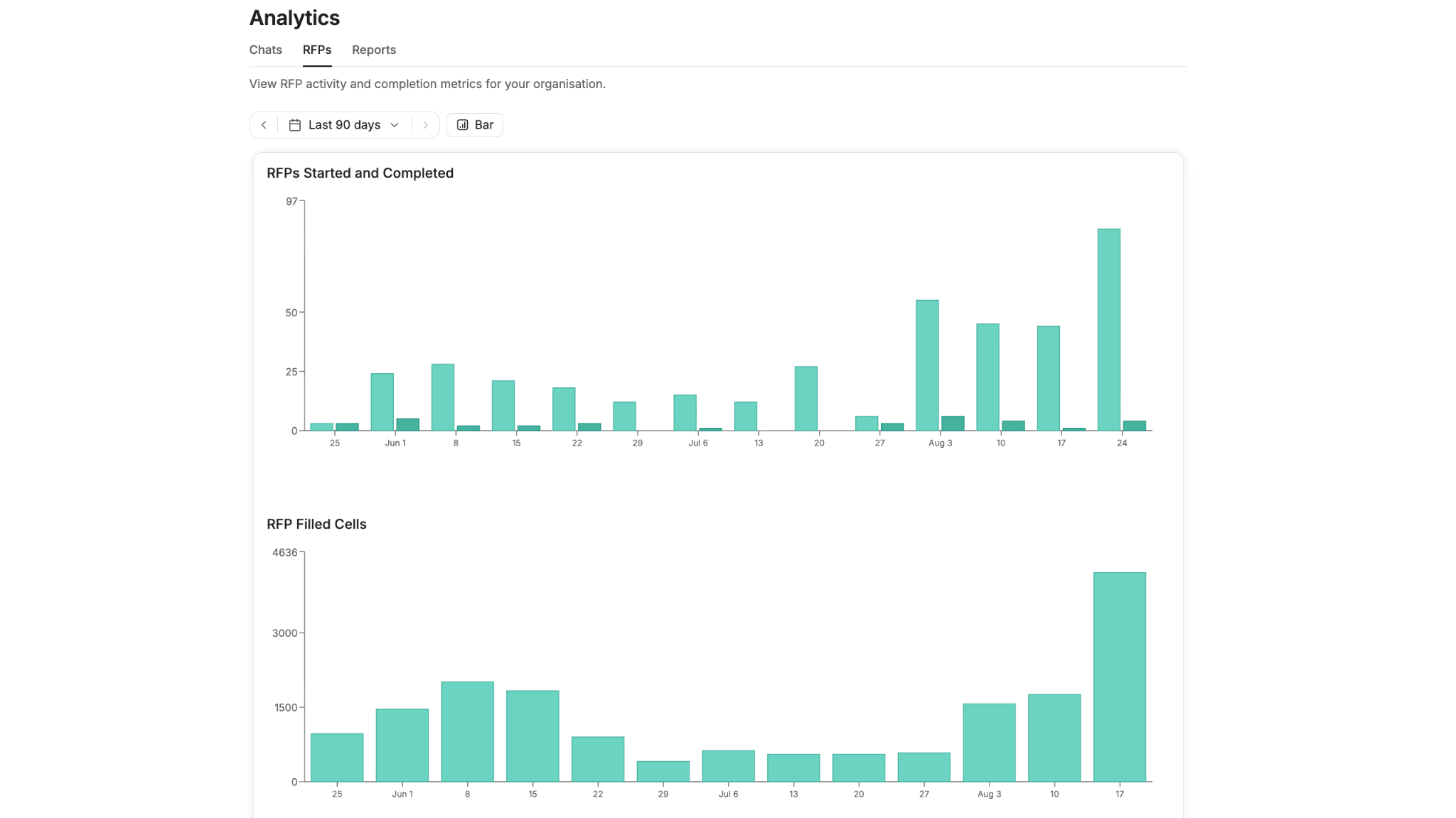
August 3, 2026
Document RFP responses
Not every RFP is a spreadsheet. With Document RFP responses, you can now answer narrative RFPs in a full document editor, from first outline to final export, right next to your questionnaires and projects.From RFP to draft in minutes
Upload the RFP and choose Document. Realm reads the request and proposes a response outline you can refine in chat. When the structure is right, draft the full response in one click, in the language you choose, with the agent you choose, grounded in your company knowledge.Write it together
The editor is built for teams: edit together in real time, leave comments and assign them as tasks, review AI-suggested edits before accepting them, and keep track of versions, deadlines, and status as the response moves toward completion.Export anywhere
When the response is ready, export it as PDF, Word, Markdown, or straight to Google Docs. Bring your own Word reference document to apply your company’s branding and styling on the way out.Reuse every win
Opt a completed response into your answer library with a single click, and Realm will reuse its content to answer future questionnaires and chats.July 29, 2026
Realm Design System v2.0
A shared foundation for building better product We’ve given the whole app a fresh look. A rebuilt design system brings cleaner typography, refined colors, and consistent spacing to every screen, so Realm feels calmer, clearer, and easier to work in.A refreshed design system
Every surface now draws from a single set of design tokens for color, type, and depth. The result is a more coherent interface where buttons, inputs, menus, and cards all look and behave the same way, wherever you find them.Clearer navigation
The sidebar and top-level navigation have been polished for quicker orientation, with tidier icons, gentler hover and selection states, and better contrast so you always know where you are.Sharper light and dark modes
Both themes were re-tuned for comfortable contrast and consistent borders and rings, so text stays legible and interactive elements stay obvious in any lighting.March 3, 2026
Tools for Realm
You can now use tools with the main Realm agent. This means that you can for example enable the Google Calendar tool and ask Realm to schedule a meeting for you - previously you would have had to create a new agent with access to the tool. You can toggle which tools Realm can use from the capabilities menu in the chat bar.New response modes: Fast, Auto, and Research
You can now toggle between three distinct modes in chat to optimize for speed or thoroughness:- Fast: Optimized for fast responses. Searches for relevant sources and gives you and answer. Best for simple questions or quick summaries where speed is the priority.
- Auto: The default mode. Realm analyzes your prompt and automatically selects the best model and processing depth to give you the most accurate answer efficiently.
- Research: The same research mode you already know and love. In this mode, Realm will perform multiple searches, analyze various documents, and synthesize a comprehensive response.
Improved designs for Agents and Admin
We’ve updated the user interface for Agents, Triggers and the Admin and Settings pages.Answer Quality for RFPs
When filling out RFPs, Realm now also checks the quality of the answer given, judging it based on three criteria: Trustworthiness (did the answer come from a trusted source), Completeness (does it completely answer the question), and Sensitivity (is the answer a customer-specific topic, like pricing, involve legal issues, etc). It also includes an explanation why these scores were given. Use these scores to point you to answers that should be checked by a human!February 10, 2026
Tools, Realm App & Voice dictation
More granular tool settings
We’ve added more granular controls for how your agents use tools. When creating agents you can now:- Define which specific actions an agent is allowed to perform—for example, allowing an agent to add internal notes to Freshdesk tickets without giving it the power to create new ones. We’ve also added an “Ask before running” setting, which requires manual user approval in chat before an agent executes a specific action.
- Set preset parameter values for tools, such as a designated Slack channel or a fixed Salesforce field, ensuring the agent always uses those values.
New connectors and tools
We’ve launched two new data connectors and two new tools:- Google Drive Tool: Realm can now create and edit documents, slides and spreadsheets in Google Drive.
- Google BigQuery Tool: Realm can now query data from BigQuery.
- Chorus Connector: You can now sync Chorus call transcripts to Realm.
- Clari Connector: You can now sync Clari call transcripts to Realm.
Realm App
You can now install Realm as a Progressive Web App (PWA). This provides a more seamless, app-like experience on both desktop and mobile. By installing the PWA, you can launch Realm directly from your dock or home screen and use Realm in a dedicated window. The app is available for users using Chrome.Voice dictation
We’ve added a new voice dictation feature to the chat. Simply tap the microphone icon to dictate your prompts; Realm will transcribe your voice and send it to the agent.November 1, 2025
Agents: Tools, Actions & MCP
We’re launching the next major evolution for Agents in Realm: Tools, Actions, and Model Context Protocol (MCP) support. This release marks the first time Realm gains the ability to not just retrieve knowledge, but to create information and take action in external systems. It’s a significant step toward a future where collaborating with AI agents will be as natural as handing off a task to a human colleague. Tools and Actions: Agents that do tasks for you
Tools and Actions enable agents to perform tasks in external systems, such as updating a HubSpot deal, creating an email draft in Outlook, or adding a comment to a Freshdesk ticket. Realm admins control which Tools are made available to the organization. For this initial release, we support the following integrations: HubSpot, Salesforce, Gmail, Google Calendar, Outlook (email + calendar), Slack, Freshdesk, and GitHub. We’re actively working on adding more. Each Tool comes with a pre-selected list of Actions, like “Update Salesforce Account” or “Create Google Calendar Event”, that agents can perform. Giving agents access to tools
Once a Tool is configured in your workspace, you can make it available to specific agents. You can add multiple Tools per agent, giving each one access to all Actions associated with those Tools. For best results, provide clear instructions on when and how the agent should use Tools. The recommended practice is to tag Tools (e.g., @Slack) in the appropriate places within your agent’s instructions. Model Context Protocol (MCP) support
In addition to our native Tool integrations, admins can now connect Realm with any application that offers an MCP server. MCP is an open standard that enables AI systems to securely connect to external data sources and tools. Since MCP servers typically offer a wide range of Actions, you may want to limit which Actions are made available to maintain control and clarity. What you can build
This is the first version of Tools and Actions, and we’re excited to see what you create. Here are a few examples from our internal testing, many of which combine Actions with Triggers:- Check my calendar every evening and send me a Slack message with notes about tomorrow’s external calls.
- Whenever a HubSpot deal moves to “Closed Won” or “Closed Lost”, automatically fill out the Win/Loss Reason field.
- Retrieve usage data from Posthog (via MCP) and send a weekly update to a designated Slack channel.
- For any new support tickets in Freshdesk, post an internal note containing an analysis of the issue, similar past tickets, and a suggested resolution path.
October 1, 2025
Agents: Runbooks, triggers & Slack output
Today marks the first major step in evolving Realm into a true Agent platform. This release introduces the core components necessary to build fully autonomous, workflow-driven AI agents that operate across your entire revenue stack. Runbooks: Define agent logic
Runbooks define how your agents think and work. They allow you to move beyond simple Q&A and build complex, multi-step workflows. You can write detailed, step-by-step instructions, reference specific documents or tools, and use variables like {{Customer}} to personalize the execution. For example, a QBR Prep Agent can now automatically gather context, pull data from your systems, and prepare a briefing by following your written logic one step at a time. Triggers: Automation on schedule or event
Until now, agents required a manual query to run. With Triggers, your agents can now start automatically based on a recurring schedule or specific events, turning passive knowledge into active execution. This enables powerful automation, such as:- Running a Competitor Intelligence Agent every Monday morning to generate a briefing on key competitors.
- Activating a Demo Request Agent instantly whenever a new message appears in a designated Slack channel to research the prospect immediately.
First action: Slack output
While Runbooks enable step-by-step instructions and Triggers allow them to run automatically, Actions are the missing piece that enables agents to perform tasks within your connected tools. Our first action allows agents to post messages directly in Slack. For instance, the Demo Request Agent can automatically post a full prospect briefing to a channel immediately after a new request is detected. This is only the beginning. We will be expanding Actions in the coming weeks. Introducing agent templates
To help you get started quickly, this update includes 15 pre-built agent templates. We’ve created these templates so you can replicate, edit, and deploy them immediately within your team. You can duplicate and customize them for your specific needs, and we will continue to expand this library as we grow our agent capabilities.August 28, 2025
Research, workflow improvements & GPT-5
Research
Research is a powerful new mode that lets Realm analyze your company’s knowledge in depth and answer your most complex questions. In Research, Realm creates a plan, reads a vast amount of sources, hones its approach based on information it encounters, and finally pulls together a comprehensive report that might take human hours to produce. Users who have tried Realm have reported that it’s extremely powerful for use cases such as:- Analyzing a large amount of CRM data
- Summarizing everything that’s been discussed regarding a topic
- Finding deeply buried results that you suspect Realm might not typically surface
GPT-5
OpenAI’s GPT-5 is now available in Realm. You can talk to the model itself and build Assistants that use it. RFP workflow: PDFs, improvements
We’ve made several improvements and additions to the RFP workflow: - PDF and Docx RFPs are now supported. Note that the feature still works best for RFPs with a clear list of questions. It isn’t really intended for completely free-form proposals.
- You can resize columns for better readability
- We’ve fixed an issue where the parsing would previously drop some data validation fields in Excel RFPs
- The UI is more polished than before
- You can now assign a Reviewer who must check answers before they are approved.
Improved Assistant-creation flow
We’ve redesigned the Assistant-creation page. This should particularly help new users who are creating their first Assistants. The page now better explains how to use each configuration. We’ve also added the option to auto-generate a prompt using an LLM. This is an excellent way to draft an initial prompt that you can then edit and polish manually. Additionally, you can now organize Assistants with labels. Think “Sales”, “Marketing”, or “RFP Assistants”. Data Analysis improvements
Did you know that, if you upload a spreadsheet to Realm, Realm can write code to analyze it? The same also works in Research – ask Realm to find a given spreadsheet and analyze it. Previously, Data Analysis tended to generate multiple unnecessary copies of the same graph. We’ve now fixed this, and you should see a single graph. Gong connector out of beta
The Gong connector is now out of beta. Realm can now also connect your Salesforce and HubSpot data with Gong. This allows you to see which companies and deals are associated with your Gong calls, providing a more complete picture of your customer interactions.June 16, 2025
RFP workflow, API & new connectors
New RFP workflow
RFPs, RFIs, and RFQs have always been popular use cases for Realm. Now, we’ve launched a dedicated feature for them that lets you automate responses with AI, collaborate with your team to polish the work, and repurpose the work in future RFXs. New features include: - Tabular UI – work with spreadsheets directly inside Realm.
- Collaboration – assign questions for colleagues to review.
- Editing – edit AI-drafted answers.
- Approvals – approve finalized answers.
- RFP knowledge base – completed RFPs automatically become part of your knowledge base.
API
The new Realm API allows you to build use cases on top of Realm’s infrastructure and to integrate custom data into Realm. The key features are: - Assistants: Call on all models and Assistants available in Realm from outside the product.
- Push Knowledge: Push knowledge to Realm from external sources using the API.
Make Realm new tab page in your browser
The Realm Browser Extension allows users to access Realm from anywhere in Google Chrome and Microsoft Edge. Now it’s also possible to set Realm as your new tab page. In addition, we’ve also made speed and stability improvements to the extension. New connectors
We’ve launched three new connectors in the past few weeks:- Coda: You can now connect your Coda documents to Realm.
- Gong (beta): You can now sync Gong call transcripts to Realm.
- Personal Google Drives: You can now sync data from your personal Drive to Realm, not just Shared Drives.